How Small Destination Marketing Organizations Can Keep Business Directories Accurate Without Burning Out Staff

Updated: Aug 9

By Andrew Applebaum, Digital Tourism Expert
To reduce manual work when maintaining a regional business directory, small destination marketing organizations (DMOs) should use automated ingestion tools to handle baseline updates—like hours, links, and operational details—while preserving limited staff hours for manual quality reviews of high-impact content like local context, accessibility notes, and visitor-facing imagery.
Maintaining an extensive directory of local operators is vital for any region, but it often becomes an operational bottleneck. Small tourism teams frequently lose hours updating changing operational details across a large regional directory. This manual administrative burden leaves less capacity for direct partner support, campaign planning, and visitor experience work.
The Handoff Problem: Why Annual Audits Fail
Many destination marketing organizations rely on a single, massive content cleanup every spring. In practice, relying on one static annual content audit often leads to outdated storefront descriptions, broken links, and visitor frustration. Local businesses change their hours, update their websites, or shift to seasonal schedules long before your next scheduled audit rolls around.
When I review a directory workflow, I look for the handoff points: who checks new listings, who approves edits, who handles partner corrections, and who fixes outdated hours.
If your workflow requires a staff member to manually copy and paste details from a business's Facebook page or website into your CMS every time something changes, the system will eventually break down due to a lack of staff hours. Instead, small teams need a structured workflow that divides labor between automation and human insight.
The Hybrid Work Plan: Automation for Data, Humans for Context
Automating directory configurations can significantly reduce the time spent on data entry, but it requires a clear division of responsibilities. One detail that is easy to miss is that automation can help collect or organize information, but it cannot judge whether a listing feels useful to a visitor.
Automation is excellent at scraping verified operational addresses, standard business categories, and links. However, human review remains essential for checking local context, tone, accessibility notes, seasonal information, and sensitive cultural content.
For instance, remote or low-connectivity areas have successfully used automation to maintain coverage without overwhelming staff. In Alaska, Visit Sitka used an AI business directory tool alongside offline maps to manage their regional content. This approach allowed them to achieve 112 businesses listed through the AI-powered directory and generate 3,236 POI views.
While this deployment shows that automated tools can successfully build out and maintain listing coverage in remote environments, it also highlights the need for a practical framework on the ground to ensure those listings remain highly relevant to visitors over time. The metric reflects initial discovery and catalog breadth, but long-term value relies on the team's validation process.
Operating Template: The Small-Team Directory Workflow
To establish a resilient directory maintenance process without over-allocating staff resources, utilize this two-part workflow framework.
A Note on Street-Level Friction: An issue I see often on the ground is that local business staff turn over quickly. A workflow can be mathematically perfect, but if the new shift manager doesn't know who owns the directory listing or how to access it, the data stalls. The framework below is built to keep the entry barrier low for busy merchants while keeping validation firmly in your team's hands.
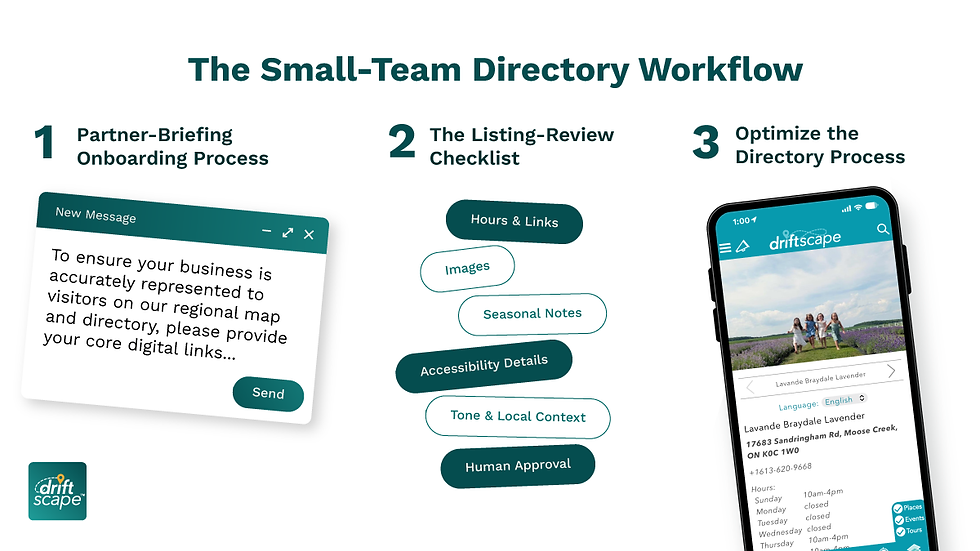
1. Partner-Briefing Onboarding Process
When a local business joins your directory or updates their profile, use this standardized script and submission process to minimize back-and-forth communication.
Merchant Onboarding Text Template"To ensure your business is accurately represented to visitors on our regional map and directory, please provide your core digital links (website, primary social channels, Google Business profile). Our system uses automated directory configurations to monitor these links for core operational updates like hours and location. For your unique visitor description, highlight what makes your experience distinct, any seasonal availability, and specific accessibility details (e.g., zero-step entries, paved paths) that automated systems cannot easily detect."
2. The Listing-Review Checklist
Before any automated or merchant-submitted listing goes live to the public, a member of the tourism team should perform a rapid human review. Focus only on the elements automation cannot reliably verify.
Review Element | Verification Method | Operational Focus |
Hours & Links | Automated Check / Spot Check | Ensure links direct to active landing pages, not dead homepages. |
Images | Human Review | Confirm photos are high-resolution and clearly showcase the visitor experience. |
Accessibility Details | Human Review | Verify specific notes like step-free access, sensory-friendly hours, or accessible parking. |
Seasonal Notes | Human Review | Check for clear instructions regarding shoulder-season or winter closures. |
Tone & Local Context | Human Review | Edit descriptions to match your region's voice rather than generic corporate copy. |
Human Approval | Final Sign-Off | The designated staff owner toggles the listing to "Published" in the CMS. |
Optimizing the Directory Process
Once your team has established a clear listing-review checklist, a digital platform can make automated local operator curation easier. Driftscape helps small destination teams scale their coverage through AI-supported tourism listings, while your team still controls final human approval via the dashboard to protect content quality.
Frequently Asked Questions
Q: How can a small team manage seasonal business hours without manual tracking?
A: Configure your directory system to pull data from platforms that operators naturally keep updated, such as their Google Business or main social profiles. Use automated tools to flag discrepancies, but assign a staff member to run a targeted sweep of seasonal operators specifically two weeks before peak summer or winter openings.
Q: What happens if automated listings pull incorrect information?
A: Automation can make mistakes with complex text or overlapping addresses. Your workflow must include an approval gate where no automated content goes live to the public without a staff member checking the "Human Approval" boxes on your checklist. Treat automation as a draft generator, not a final publisher.
Q: How do we get local merchants to provide high-quality accessibility or seasonal details?
Merchants often experience form fatigue. Instead of a long, open-ended questionnaire, provide a simple checklist with specific options (e.g., "Paved parking available," "Braille signage," "Closed from November to April"). This reduces the merchant's effort and generates structured, clean data for your directory.
About the author: Andrew Applebaum is a digital tourism expert at Driftscape who helps destinations, BIAs, museums, and tourism teams create self-guided visitor experiences rooted in local stories. He writes about practical ways to improve visitor engagement, support local businesses, and make tourism initiatives easier to launch and manage.
View Andrew’s profile and connect on LinkedIn.


